
How to set up a shift in Pakistan before attendance is judged

Written by the StreamHCM team for HR and payroll managers in Pakistan. Updated on 8 November 2026.
Attendance cannot mark someone late, half-day or absent until a shift says what "on time" means. Write the start, end, break and the minute rules first. The New Shift screen below is the blank form, before a name or a clock time is entered. A separate shifts list shows one saved row, General Shift, which is not that blank form.
This page describes screens captured from StreamHCM and the hour limits already set out in the overtime guide. It is not legal advice. It does not rank StreamHCM against FlowHCM, ResourceInn or WebHR.
Prerequisites
Open the form only after these are written down. The form will not invent them.
- Which statute covers the workplace: a factory rule or a shops rule. Daily and weekly limits are not the same. The overtime guide cites the texts that were checked on 24 October 2026.
- The clock times people are expected to work, including a night shift that crosses midnight. A night shift is still one shift. How those hours count for overtime is in that same guide, under Factories Act section 46.
- Whether there is a fixed break inside the shift, and whether it is paid.
- The minute lines for a full day, a short leave, a half day and an absence. Those lines are company policy.
- How many minutes late, and how many minutes early, are ignored. That grace is also policy. The cited Acts do not publish a grace-minute number.
- Which attendance types (present, half day, short leave, absent) the company actually uses. The blank form will not save until those types are chosen.
What the law sets, and what the shift record sets
Keep the two jobs apart. Mixing them is how a roster and a payslip disagree.
| Question | Where it is decided | What the screenshots show |
|---|---|---|
| How long a day or week may run before overtime | The Act that covers the establishment. See the overtime guide. A non-seasonal factory line cited there is nine hours in a day or forty-eight in a week. A Khyber Pakhtunkhwa shop is eight hours in a day. | Neither screenshot is a copy of that statute. |
| Start, end and break for this group of staff | The shift you save | The blank form still shows placeholders such as "e.g. 9:30 AM". The list row General Shift reads 09:00 AM / 06:00 PM. |
| Grace for late arrival and early exit | Company policy on that shift | General Shift is 0 / 0 min. The blank form's summary also says 0 min, because no clock time has been typed yet. |
| Present, short leave, half day, absent | Minute thresholds on the shift, plus the attendance types you attach | The blank form opens with 540, 370 and 210 minutes. Those are starting values, not a saved policy. |
The shifts list, with one saved row
This is the shifts screen after the empty area under the row has been cropped. Nothing was added to the interface. The account header was already outside the capture. The only shift name on it is General Shift.

Read the columns as they are labelled: shift name, shift type, start / end, grace (late / early), attendance policy, status, and actions. General Shift is a fixed shift, it is active, and both grace figures are zero. That is one configured row. It is not a recommendation to run every site from 9:00 to 6:00, and it is not the blank form in the next section.
The blank New Shift form
This capture is the form as it opens, before anyone types a name or a time. It was closed with Cancel. No shift was created from it. The summary heading is "Untitled shift". The name field is empty and shows the placeholder "e.g. Morning Shift". Start, end and break fields are empty and show "e.g. 9:30 AM".
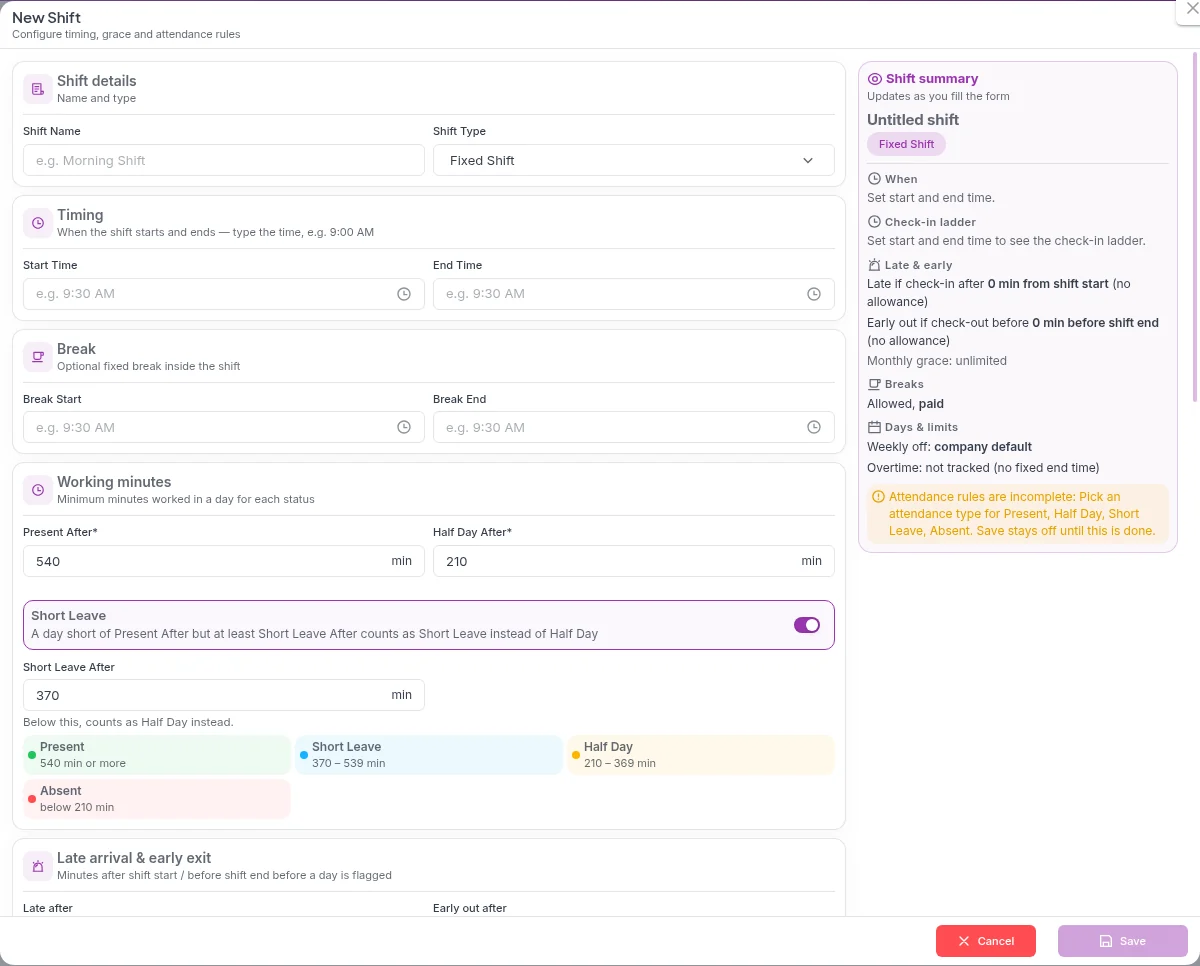
Shift type on this empty form already reads Fixed Shift. That is the control's initial selection, not a shift you have named and saved. The summary says it updates as you fill the form. With no start and no end, the summary says a late mark would fall after 0 min from shift start, an early exit after 0 min before shift end, monthly grace unlimited, breaks allowed and paid, weekly off at the company default, and overtime not tracked because there is no fixed end time yet. Those lines describe this empty form. They are not the General Shift row.
A yellow notice on the form says the attendance rules are incomplete until an attendance type is picked for Present, Half Day, Short Leave and Absent, and that Save stays off until that is done. The capture stops there. It does not show those types being chosen, and it does not show a successful save.
Numbered workflow
- Write the policy in the prerequisites list, including the statute from the overtime guide that actually covers the branch.
- Open Shifts. The list above is what a single saved shift looks like. Use Add for a new one.
- On New Shift, type the real name. The empty field only shows the placeholder "e.g. Morning Shift". Do not save that placeholder as the name.
- Choose the shift type. Fixed Shift is only the value already showing on the blank form.
- Type the real start and end. A 9:00 to 6:00 day and a night shift that crosses midnight are both typed here. The overtime guide explains how a factory night shift is counted. It does not fill this form for you.
- If the shift has a fixed break, type break start and end. If it does not, leave the break fields empty. The summary's "Allowed, paid" line is the empty form's break status, not a legal finding that every break is paid.
- Replace the starting minute values if they are not your policy. The blank form shows Present After 540, Half Day After 210, Short Leave switched on, and Short Leave After 370. How those three numbers draw the status ladder is the half day and short leave guide.
- Choose the attendance types the yellow notice asks for. Until that is done, the form says Save stays off.
- Set late-after and early-out minutes to the grace in the policy. This capture shows the labels "Late after" and "Early out after". It does not show a number typed into those fields.
- Save only when the summary matches the policy. Cancel discards the blank form, which is what happened for the screenshot.
- Return to the list and check the new row: name, type, start / end, grace, policy and status. Assigning that shift to people is a later step, on shift scheduling and the shift management module.
What to compare on a trial
Buyers in Pakistan often look at StreamHCM alongside FlowHCM, ResourceInn and WebHR. The useful test is the same on each product, with your own times. Create one shift. Enter start, end and break. Set the minute lines for present, half day and short leave, and the grace for late and early. Punch one late arrival and one early exit. See whether the attendance result uses that shift, and whether payroll uses the attendance result. A marketing page cannot answer that. The checklists already on this site, for FlowHCM, ResourceInn and the HR software comparison, are the same idea. They do not score the other product. There is no WebHR scorecard here, for the same reason.
Questions
Does the screenshot show a shift that was saved from this form?
No. The New Shift screenshot is the blank form before a name or clock time is typed. The shifts list is a different screen. It shows one already active row named General Shift.
Is the 540-minute starting value a legal working day?
No. 540 is the number already in Present After when the blank form opens. Nine hours is also a daily limit in the Factories Act text cited on the overtime guide, but the form does not say it is applying that Act. A Khyber Pakhtunkhwa shop uses an eight-hour day. Replace 540 if it is not your policy.
What does Fixed Shift in the blank form mean?
It is the shift type already selected on the empty form. It is not a saved shift called Fixed Shift, and it is not proof that every employee works 9:00 to 6:00.
Where do grace minutes come from?
From the policy you type onto the shift. The General Shift row on the list is set to 0 late minutes and 0 early minutes. The blank form's summary also says 0 minutes, because start and end are still empty. Those are two different screens.
What should we check against FlowHCM, ResourceInn or WebHR?
The same trial, not a ranking. Create a shift, set start, end, break and the minute thresholds, punch a late arrival and an early exit, and see whether attendance and payroll use that shift. This page does not score those products.
Related: half day, short leave and late arrival, overtime rules, attendance tracking, biometric attendance, attendance calculator, shift management.
Set one shift and run a week of punches against it
Request a 14-day trial. No card is taken on this site.