
MSS portal: what manager self-service is and how to find your login

Written and reviewed by the StreamHCM HR & Payroll Team. Last updated 16 November 2026. Published 14 November 2026.
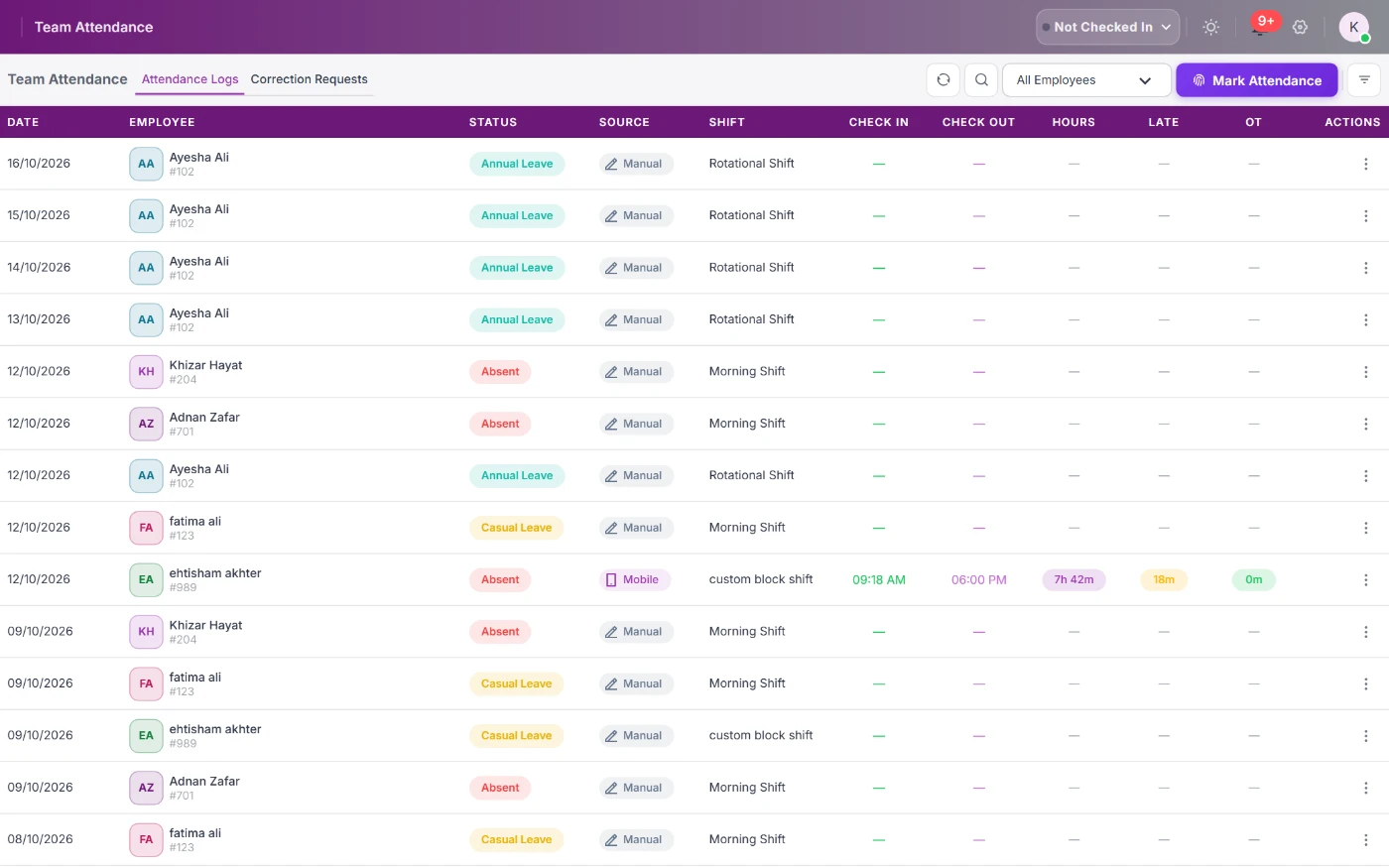
An MSS portal is manager self-service: the login where a line manager approves leave, overtime and expenses, and sees that team's attendance. StreamHCM lists eight manager actions on this page. Your company's URL and password come from its HR team, not from a public site.
Looking for your company's MSS login?
This page is not the login for any other company's MSS portal. Use the link or app your HR department gave you, or ask them to reset your access. If your company uses StreamHCM, managers sign in with their work account at admin.streamhcm.com.
What is the full form of MSS in HR?
The full form of MSS in HR is manager self-service. It is the manager's own screen inside the employer's HR system, used to act on the people who report to that manager. It is not a government portal and not a website every company shares.
The IHRIM glossary is the definition used here: manager self-service is the manager's access to HR tasks. Microsoft's Dynamics 365 overview describes the same idea for a manager acting on their team. Neither page is your company's login. The employee side is employee self-service in Pakistan.
How do I log in to my company's MSS portal?
You log in with the address and the account your employer's HR or IT team created. This page cannot open another organisation's portal and does not know that password. Companies on StreamHCM give managers a work account at admin.streamhcm.com. If it is missing, HR creates the user. A job title alone does not open the manager view.
- Ask HR or IT for the portal address. Do not reuse a link from a search result that belongs to a different employer.
- Sign in with the work account HR created. A personal email that was never added will not show a team.
- If you use StreamHCM, that account is the same company login as employee self-service. The manager view appears when the reporting line exists.
- A reset, if you are locked out, comes from your employer. This website does not issue a password for another company's staff.
What are the benefits of MSS for managers and HR?
MSS helps when the manager acts before payroll cut-off, instead of sending HR a list at month end. The gains are a shorter approval wait, fewer repeated lookups, one queue for leave and overtime, and a record of who approved what. None of that is a guaranteed percentage. It depends on the reporting line and on managers using the queue.
- Approvals land before payroll cut-off, so an overtime hour is not still sitting in a chat thread.
- HR answers fewer “who is absent today” lookups, because the manager can see the team.
- Leave, shift and overtime share one queue, rather than three inboxes.
- The approval keeps an audit trail of who acted, and when.
MSS approval flow before payroll cut-off
- The employee submits the request in employee self-service.
- The manager approves it in the MSS portal, because the organisation structure says that person reports to them.
- HR checks what is still missing, such as a joiner with no shift or a punch that never arrived.
- Payroll reads the approved records. The longer note on why that step slips is why payroll takes so long, and the product page is payroll software in Pakistan.
What is an HCM self-service portal?
An HCM self-service portal is ESS and MSS together inside one HR system. The employee sees their own payslip, leave and attendance. The manager approves requests and sees the team. There is no public HCM portal that every employer shares. The company issues both logins. Read what HCM is.
- ESS: the employee opens their own payslip, leave balance and attendance. The product page is employee self-service software.
- MSS: the manager approves and sees the people who report to them.
- Both sit on the same employee record. The manager does not need the payroll admin login.
- Pricing for the product is on pricing. Attendance for the team is attendance management. The wider system is HR software in Pakistan.
What is an MSS portal?
MSS means manager self-service. It is the screen a line manager opens to act on their own team, instead of asking HR to look up who is absent or which leave is still waiting. The employee side of the same system is ESS, employee self-service, written up in employee self-service in Pakistan. The product page for the employee and manager portal together is employee self service software.
Search results for “MSS portal” often show another organisation's login page. Those sites belong to those organisations. They are not a shared manager portal for every employer, and this page is not one of them.
What can a manager do in an MSS portal?
In StreamHCM the manager portal includes these actions. They sit on the same employee record HR already uses, so the manager is not keeping a second list.
- Team dashboard: one screen for the people who report to that manager.
- Team attendance: who is present, late or absent today.
- Team leave: who is off this week and next.
- Approvals: leave, shift and overtime in one queue.
- Live employee status: who is online, offline or on a break.
- Team tasks: progress on work assigned to the team.
- Team performance: KPIs and goals for those reports.
- Team payroll summary: a high-level cost view, not every salary line unless the role allows it.
The full module list is on the manager portal page. Expense claims follow the same idea: the employee attaches a receipt, and the manager approves it before reimbursement.
MSS vs ESS: what's the difference?
| ESS (employee self-service) | MSS (manager self-service) | |
|---|---|---|
| Who uses it | The employee | The line manager |
| Typical actions | Open a payslip, request leave, check attendance | Approve a request, see the team, read a team report |
| Data visible | That person's own record | The people who report to that manager |
| Example | Download this month's payslip | Approve three leave requests before cut-off |
Both views use the company's StreamHCM account. The employee app is described on the ESS module. A manager does not need the HR admin login that configures payroll.
What does “MSS manager” mean?
An MSS manager is the person whose role in the HR system is the manager role. They are a user of the portal, not a separate product. HR creates that user, marks who reports to them, and the portal then shows that team. A job title on a business card does not by itself open the manager view. The reporting line does.
How do managers get MSS access?
HR creates the employee, assigns the manager in the organisation structure, and turns on the manager role. Until that reporting line exists, there is no team for the portal to show. How companies, branches, departments and reporting lines are set is on organization management. The login itself still comes from the employer. This website does not issue a password for another company's staff.
What should a good MSS portal include?
- One approval queue, not a separate inbox for leave, overtime and expenses.
- A phone view, so an approval does not wait until the manager is at a desk.
- Routing along the reporting line, so a request reaches the right manager.
- An audit trail of who approved what, and when.
- A link into payroll, so an approved overtime hour is the hour that gets paid.
How StreamHCM's manager portal works
A request starts in employee self-service. It lands in the manager's queue because the organisation structure says that person reports to them. Approving it updates leave, attendance or the expense, and payroll reads the approved result. The manager sees team attendance and tasks on the same login.
If you are choosing software, the walkthrough is the manager portal module. The wider product is HR software in Pakistan. A 14-day trial is requested from the contact page. No card is taken on this site.
Sources
- IHRIM glossary: manager self-service
- Microsoft Learn: manager self-service overview (Dynamics 365 Human Resources)
Questions
What is an MSS portal?
An MSS portal is the manager self-service part of an HR system. Line managers use it to approve leave, overtime and expense requests, and to see their team's attendance, tasks and performance. It is not a public website with one shared login.
Is MSS the same as ESS?
No. ESS is the employee view: the person's own payslip, leave request and attendance. MSS is the manager view: approvals, the team, and reports for the people who report to that manager.
How do I log in to my company's MSS portal?
Use the link or app your HR department gave you, or ask them to reset your access. This page is not the login for any other company's portal. If your company uses StreamHCM, managers sign in with their work account at admin.streamhcm.com.
Can managers approve leave on a phone?
Yes, when the company's HR system includes a mobile manager view. In StreamHCM, leave, shift and overtime requests land in one approval queue that the manager can open on the web or in the app.
Does StreamHCM have a manager self-service portal?
Yes. StreamHCM's manager portal is the MSS view inside the same account as employee self-service. The product page is the manager portal module.
What is the full form of MSS in HR?
MSS stands for manager self-service. It is the manager's screen in the employer's HR system for the people who report to that manager.
What are the benefits of MSS for managers and HR?
Managers approve before the payroll cut-off, HR spends less time looking up the same attendance, and the queue keeps a record of who approved what. This page does not claim a percentage saving.
What is an HCM self-service portal?
It is ESS and MSS together: the employee sees their own record, and the manager sees the team. The company issues both logins. There is no public HCM portal shared by every employer.
Give managers one approval queue
Try the manager portal on a 14-day trial with your own reporting lines.